
Introducing Advanced Tool Use on the Claude Developer Platform
综合评分
8.9
A 级
技术深度 (x1.1)10
可操作性 (x1.3)9
创新性9
影响力 (x1.3)9
教育价值 (x1.1)9
时效性8
可复现性8
核心要点
三大高级工具特性: Tool Search Tool(按需发现)、Programmatic Tool Calling(代码编排)、Tool Use Examples(示例学习)
Tool Search Tool: 从 72K tokens 降至 8.7K tokens,节省 85% 上下文,Opus 4 准确率 49%→74%
Programmatic Tool Calling: Agent 写 Python 代码编排工具调用,中间结果不进入上下文,token 减少 37%
Tool Use Examples: 在 schema 旁提供具体使用示例,准确率 72%→90%
三层策略: 先解决最大瓶颈 → 再叠加其他特性 → 互补增强
文章结构大纲
1. 引言: 工具使用的三个瓶颈
分析 Agent 使用工具时面临的三大问题: 工具定义占用过多上下文、多步骤编排低效、工具使用不够直观。文章提出三个对应的高级特性。
2. 特性一: Tool Search Tool(按需工具发现)
将工具定义从预加载改为按需搜索。Agent 通过 BM25/Embedding 等策略在运行时发现和加载所需工具,大幅减少上下文占用。
3. 特性二: Programmatic Tool Calling(编程式工具调用)
Agent 通过编写 Python 代码来编排工具调用,支持并行、循环、条件分支。中间结果不进入对话上下文,只返回最终摘要。
4. 特性三: Tool Use Examples(工具使用示例)
在工具 schema 旁提供具体的输入示例,帮助模型理解格式约定、组合模式和边界情况。
5. 组合策略与性能数据
三大特性可以叠加使用,互补增强。文章提供了详细的 A/B 测试数据和 token 节省指标。
深度解读 苏格拉底式深度解读 →
1工具定义膨胀问题 — Tool Search Tool 的动机
When you have dozens or hundreds of tools, the tool definitions alone can consume tens of thousands of tokens — crowding out the actual context the model needs to reason about the task.
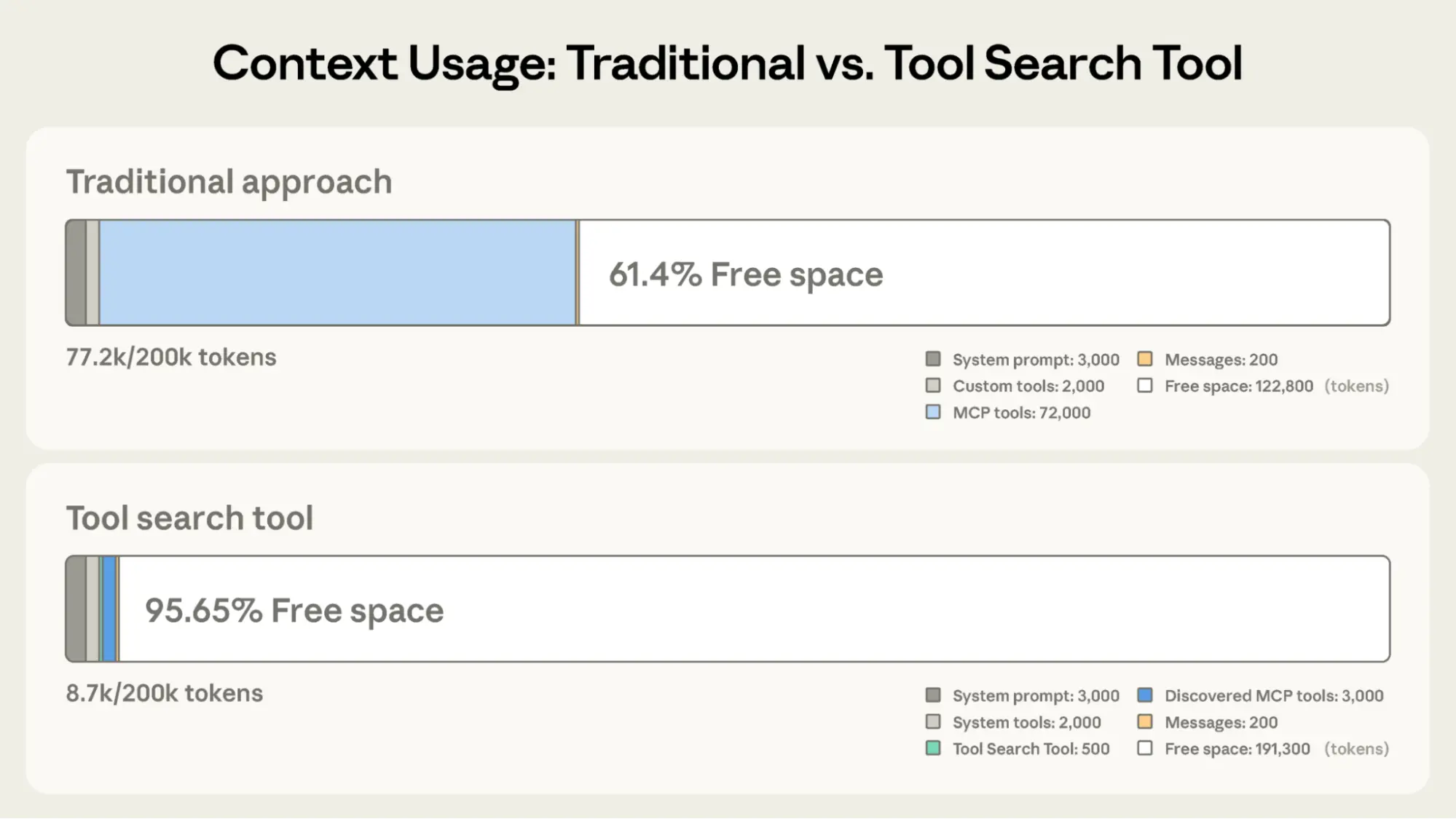
Tool Search Tool — 按需发现和加载工具定义,减少 85% 上下文占用
2Programmatic Tool Calling 的核心机制
Instead of the model calling tools one at a time through the standard tool use loop, programmatic tool calling lets the model write Python code that orchestrates multiple tool calls — with loops, conditionals, and error handling.
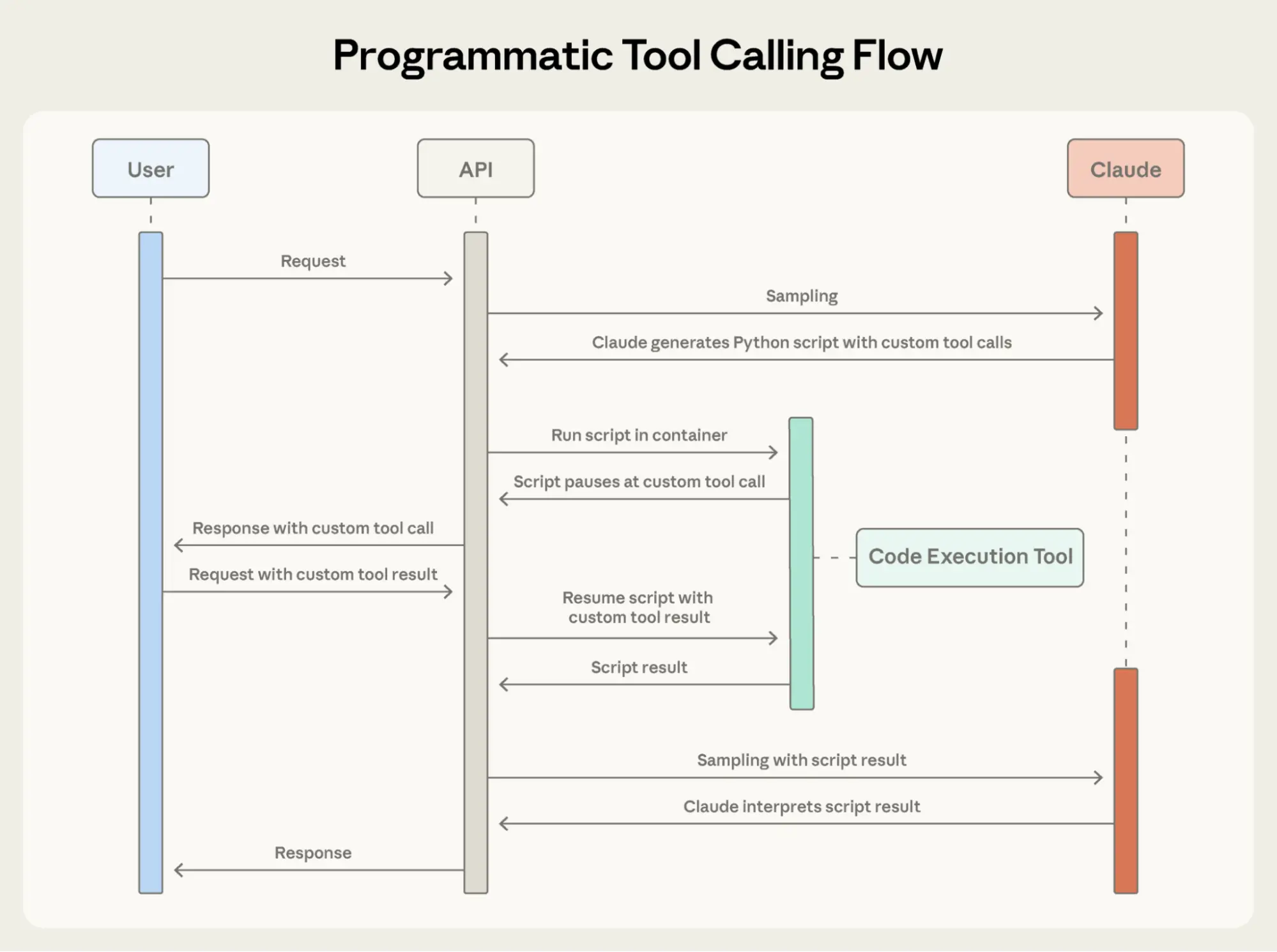
Programmatic Tool Calling — Agent 编写 Python 代码编排多步骤工具调用
这是从声明式到命令式的范式转换:
传统工具调用(声明式):
- Agent: "调用工具 A" → 返回结果 → "调用工具 B" → 返回结果 → ...
- 每次调用结果都进入对话上下文
- 循环/条件需要多轮对话实现
- 100 行数据 × 10 次 API 调用 = 1000 条中间结果全部留在上下文中
Programmatic Tool Calling(命令式):
- Agent 写一段 Python 代码,代码中直接调用工具
- 中间变量存在 Python 运行时,不进入对话上下文
- 支持原生 for/while/if,复杂逻辑一行搞定
- 最终只返回 Agent 指定的摘要结果
关键数据: 处理一个 200KB 的数据集,传统方式产生 200KB 中间结果,Programmatic 方式只返回 1KB 摘要。Token 减少 37%,但信息密度大幅提升。
工程启示: 这实质上是把 Agent 从"对话式编程"升级为"代码式编程",利用 Python 的控制流而非 LLM 的多轮推理来实现复杂逻辑。
3Tool Use Examples 的效果数据
Adding just a few concrete input examples to your tool definitions improved tool use accuracy from 72% to 90% in our benchmarks.
这个数据令人震惊 — 仅仅添加几个示例就能提升 18% 的准确率:
为什么示例如此有效:
- JSON Schema 定义的是"结构"(类型、约束),但不传达"意图"和"惯例"
- 示例同时展示了: 预期的参数组合、格式约定、边界情况的处理
- 模型通过 few-shot 学习快速理解工具的"隐性规范"
示例设计的三个层次:
- 完整示例: 所有参数都填写,展示理想输入
- 部分示例: 只填必要参数,展示最小可行输入
- 边界示例: 展示特殊值的处理(空值、超长文本、特殊字符)
与 Prompt Engineering 的联系: 工具描述 + 使用示例 = 系统化的 prompt engineering,但作用域限定在单个工具。这比全局 prompt 优化更精确、更可维护。
4组合策略的实施路径
The three features are complementary and can be stacked: first solve your biggest bottleneck, then layer on additional features for compounding gains.
文章推荐的三层叠加策略:
第一层(最大瓶颈): Tool Search Tool
- 解决工具定义膨胀问题
- 单独使用就能获得 85% token 节省
- 适合工具数量 > 20 的场景
第二层(编排效率): Programmatic Tool Calling
- 解决多步骤工具调用的上下文污染
- 在 Tool Search 基础上进一步减少 37% token
- 适合需要循环/并行/条件逻辑的任务
第三层(准确率提升): Tool Use Examples
- 解决模型对工具理解的准确性
- 准确率从 72% → 90%
- 成本最低(只需添加几个示例),但收益显著
叠加效应: 三层都启用时,Agent 在保持高准确率的同时,上下文占用从 72K 降至约 5K tokens。这验证了 Effective Context Engineering 的核心论点: 优化上下文质量 > 扩大上下文窗口。
关联 GitHub 项目
claude-agent-sdk-python7000 starsSDK implementing advanced tool use features
claude-agent-sdk-typescript1500 starsTypeScript SDK implementing advanced tool use features
代码实践建议
为 MCP 服务器实现 Tool Search Tool
将现有 MCP 工具标记为 defer_loading,添加 Tool Search Tool 实现按需发现
构建 Programmatic Tool Calling 工作流
实现 Agent 通过 Python 代码编排多步骤工具调用,处理大数据集只返回摘要
为复杂工具添加使用示例
为现有工具定义添加 input_examples,展示完整/部分/最小参数模式
思维流程导图
flowchart TD
  A["Advanced Tool Use"] --> B["Tool Search Tool"]
  A --> C["Programmatic Tool Calling"]
  A --> D["Tool Use Examples"]
  B --> B1["按需加载工具定义"]
  B --> B2["defer_loading: true"]
  B --> B3["regex/BM25/embedding 搜索"]
  B --> B4["85% token 节省"]
  C --> C1["Agent 写 Python 编排"]
  C --> C2["中间结果不进上下文"]
  C --> C3["支持并行/循环/条件"]
  C --> C4["200KB → 1KB 结果"]
  D --> D1["input_examples 字段"]
  D --> D2["展示格式/约定/组合"]
  D --> D3["准确率 72% → 90%"]
这是 Agent 工具生态面临的核心矛盾:
Tool Search Tool 的解决思路:
defer_loading: true,定义不随 API 请求发送这与 Effective Context Engineering 中的 JIT 策略一脉相承: 工具定义也是"上下文",应该按需加载而非预加载。