
← 返回文章详情
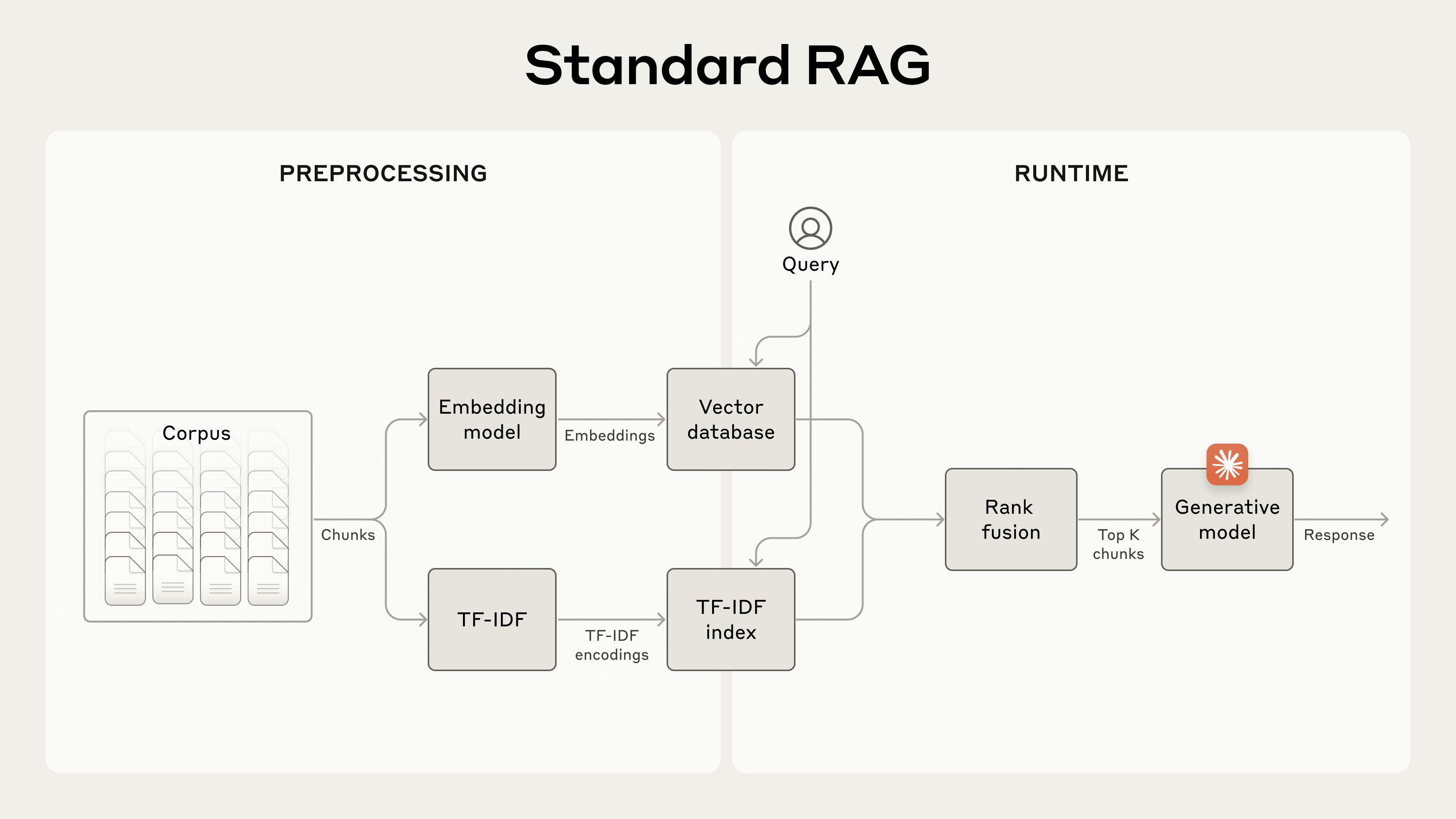


Introducing Contextual Retrieval
苏格拉底式深度解读
1分块上下文丢失的经典案例
原文摘录
The company's revenue grew by 3% over the previous quarter. → This chunk is from an SEC filing on ACME corp's performance in Q2 2023; the previous quarter's revenue was $314 million.
Standard RAG — 传统分块丢失文档上下文导致检索失败
💡 类比理解
想象你在看一本电话簿,每个号码旁边只写了'家里'、'公司'、'妈妈'。没有名字,你完全不知道这是谁的号码。Contextual Retrieval 就像是给每个号码贴上便利贴,写上'这是张三公司的电话',一下子就能找到了。
为什么 RAG 要把文档切成小块?不切不行吗?
因为嵌入模型有输入长度限制(通常 512-8192 tokens),而且语义聚焦的需求 — 短文本的嵌入向量更精确地表达单一语义,长文本的向量会被多个主题'稀释'。
分块后丢失上下文,具体会导致什么问题?
最典型的场景: 一个 chunk 说'增长了 3%',但公司名和时间信息在上一个 chunk 里。用户查询'ACME 公司 2023 年 Q2 收入增长'时,向量检索完全匹配不上这个孤立的数字。
为什么不直接用更大的 chunk 来保留上下文?
大 chunk 会引入语义稀释问题 — 一个 2000 token 的 chunk 可能包含收入、利润、现金流三个话题,嵌入向量是三者的平均,反而更难精确匹配任何单一查询。Contextual Retrieval 用'小 chunk + 上下文前缀'兼顾了粒度和上下文。
📊 原理图解
flowchart LR
  subgraph 传统 RAG
    D1["文档"] --> C1["分块"]
    C1 --> E1["嵌入"]
    E1 --> Q1["查询: ACME Q2 收入?"]
    Q1 -->|匹配失败| X["❌ 3% 增长"]
  end
  subgraph Contextual Retrieval
    D2["文档"] --> C2["分块"]
    C2 --> P["Claude 添加上下文前缀"]
    P --> E2["嵌入"]
    E2 --> Q2["查询: ACME Q2 收入?"]
    Q2 -->|匹配成功| OK["✅ ACME Q2: 3% 增长"]
  end
传统 RAG 分块丢失上下文 vs Contextual Retrieval 恢复上下文
claude-cookbooks
2Claude 生成上下文前缀的 prompt
原文摘录
Please give a short succinct context to situate this chunk within the overall document for the purposes of improving search retrieval of the chunk.
💡 类比理解
就像图书馆给每本书贴标签 — 不是让读者自己翻遍书架(向量搜索),而是由一位经验丰富的管理员(Claude)提前阅读每本书,在封面上写一句'这本书讲的是 ACME 公司 2023 年 Q2 财报'。成本低廉,但搜索效率大大提升。
为什么不直接让 Claude 每次查询时重读整篇文档?
查询时的延迟和成本会非常高 — 每次查询都要把整篇文档发给模型。Contextual Retrieval 把这个工作前置到索引阶段,查询时只需要普通的向量检索,速度快几个数量级。
Prompt Caching 是如何把成本降到 $1.02/百万 tokens 的?
关键在于文档只加载一次到缓存中。每个 chunk 处理时,文档部分从缓存读取(成本极低),只需传入 chunk 本身作为新内容。对于一篇文档切成 50 个 chunk 的场景,文档 tokens 的成本几乎为零。
为什么选用 Haiku 而不是更强的 Sonnet 或 Opus?
上下文前缀生成是一个高度结构化的轻量任务 — 只需要理解文档内容并提取定位信息。Haiku 在这类任务上与更强模型的差距很小,但成本和速度优势显著。工程上的原则: 任务越简单,模型越轻量。
📊 原理图解
sequenceDiagram
  participant Doc as 文档
  participant Cache as Prompt Cache
  participant Claude as Claude Haiku
  participant Chunk as Chunk 1..N
  Doc->>Cache: 首次加载文档(完整成本)
  loop 对每个 chunk
    Chunk->>Cache: 读取缓存的文档(低成本)
    Cache->>Claude: 文档缓存 + 当前 chunk
    Claude-->>Chunk: 返回上下文前缀
  end
Prompt Caching 驱动的批量上下文前缀生成流程
claude-cookbooks
3双技术叠加的性能数据
原文摘录
Contextual Embeddings reduced the top-20-chunk retrieval failure rate by 35% (5.7% → 3.7%). Combining Contextual Embeddings and Contextual BM25 reduced it by 49% (5.7% → 2.9%).
检索失败率降低 49% — Contextual Embeddings + BM25 混合策略
💡 类比理解
就像用两种不同的筛子淘金 — 一个筛子按颜色找金子(语义嵌入),另一个按形状找金子(BM25 关键词)。单独使用都会漏掉一些金子,但两个筛子一起用,几乎不会遗漏。
Embeddings 和 BM25 分别擅长什么?
Embeddings 擅长语义相似性匹配 — '收入增长'和'营收提升'能匹配上。BM25 擅长精确关键词匹配 — 用户搜'ACME Corp'就能找到包含这个专有名词的 chunk。两者互补。
为什么两者叠加是 49% 而不是简单相加?
因为两种技术解决的失败模式有约 30% 的重叠。Embeddings 单独降 35%,BM25 额外贡献了约 14% 的独有改善,总计 49%。这不是线性叠加,而是互补叠加。
混合检索的分数融合(Embeddings + BM25)在实践中怎么实现?
通常用倒数排名融合(RRF)或加权线性组合。RRF 不需要归一化,直接对排名取倒数求和: score = 1/(k+rank_emb) + 1/(k+rank_bm25)。简单有效,且对超参不敏感。
📊 原理图解
flowchart TD
  subgraph 基线
    A["检索失败率: 5.7%"]
  end
  subgraph 单一技术
    B["Contextual Embeddings
失败率: 3.7%
降低 35%"]
    C["Contextual BM25
失败率: ~4.5%
降低 ~20%"]
  end
  subgraph 混合叠加
    D["CE + CBM25
失败率: 2.9%
降低 49%"]
  end
  A --> B
  A --> C
  B --> D
  C --> D
Contextual Embeddings 与 Contextual BM25 的叠加效果 — 从 5.7% 降至 2.9%
claude-cookbooks
4叠加 Reranking 的最终性能
原文摘录
Reranked Contextual Embedding and Contextual BM25 reduced the top-20-chunk retrieval failure rate by 67% (5.7% → 1.9%).
三层叠加后检索失败率降低 67% — Reranking 精排效果
💡 类比理解
就像找工作筛选简历 — 先用关键词搜索和 AI 匹配快速筛出 150 份候选简历(粗排),再由 HR 仔细阅读每份简历的相关性,最终选出 20 份最匹配的(精排)。两步筛远比一步准。
Reranking 和初始检索有什么区别?
初始检索是快速粗排 — 用向量相似度和 BM25 从海量数据中召回候选,追求速度。Reranking 是慢速精排 — 用专门的交叉编码器模型逐一评估每个候选与查询的相关性,追求精度。
为什么不直接用 Reranker 检索,而要先粗排再精排?
因为 Reranker 的交叉编码器需要对每对 (query, chunk) 做完整推理,复杂度是 O(N)。如果 N=100 万个 chunk,每次查询要跑 100 万次模型推理,完全不可接受。先粗排到 150 个再做精排,才是可行的方案。
生产环境中 Reranking 的延迟和成本如何控制?
关键参数是粗排召回数。文章用 150,实际可根据延迟预算调整: 50-100 适合实时场景,200-300 适合离线分析。成本方面,Cohere Rerank API 按 token 计费,每次精排 150 个 chunk 约 $0.01-0.05。对于高价值查询(法律、医疗),这点成本完全值得。
📊 原理图解
flowchart LR
  Q["用户查询"] --> R1["粗排: 混合检索
Embeddings + BM25"]
  R1 -->|Top-150| RR["Reranker
交叉编码器精排"]
  RR -->|Top-20| F["最终结果
失败率 1.9%"]
  style Q fill:#e1f5fe
  style F fill:#c8e6c9
三层叠加检索管道: 粗排 → 精排 → 最终结果,检索失败率从 5.7% 降至 1.9%
claude-cookbooks
5全文塞入提示词的简单方案
原文摘录
Sometimes the simplest solution is the best. If your knowledge base is smaller than 200,000 tokens (about 500 pages of material), you can just include the entire knowledge base in the prompt.
💡 类比理解
就像查地图 — 如果目的地就在隔壁小区,直接走过去就行(全文塞入);如果在本市,用导航选路线(Contextual Retrieval);如果跨省旅行,就需要详细规划+中转(Contextual Retrieval + Reranking)。工具的复杂度应该匹配问题的规模。
200K tokens 大概是多少内容?
大约 500 页文本,相当于 2-3 本普通书籍。对于很多企业内部知识库(产品手册、FAQ、政策文档),这个量级完全够用。
全文塞入不会让模型'迷失在上下文中'吗?
确实存在这个风险 — 模型对中间位置信息的注意力会衰减(Lost in the Middle 现象)。但对于检索场景,模型只需要回答'根据以上内容...',且用户查询通常指向特定段落,问题不大。Prompt Caching 进一步降低了重复阅读的成本。
如何判断应该用全文塞入还是 Contextual Retrieval?
简单规则: 全量 tokens 数 × 单次查询成本 < 可接受阈值就算全塞。实操上: 知识库 < 200K tokens 且更新不频繁(< 每天 1 次)→ 全文塞入 + Prompt Caching;超过这个量级 → 上 Contextual Retrieval 管道。此外,如果检索准确率要求极高(如法律合同),即使量不大也建议全文塞入以确保零遗漏。
📊 原理图解
flowchart TD
  S{"知识库大小?"}
  S -->|"< 200K tokens"| A["全文塞入 Prompt
准确率 100%"]
  S -->|"200K - 10M tokens"| B["Contextual Retrieval
准确率 ~97%"]
  S -->|"> 10M tokens"| C["CR + Reranking
准确率 ~98%"]
  style A fill:#c8e6c9
  style B fill:#fff9c4
  style C fill:#ffccbc
根据知识库规模选择检索策略: 全文塞入 → Contextual Retrieval → CR + Reranking
claude-cookbooks